The question where to buy Deadlock cheats is really a question about evidence. A checkout page should tell you what you are buying, how long access lasts, what support exists and which claims are only marketing. If it hides those basics behind a “best hack” headline, you are choosing a slogan instead of a product.
Quick answer: buy only from a provider’s current product page, compare the exact plan and support terms, and treat price or status badges as dated information that needs checking.
Start with the product page, not the headline
A marketplace listing can be useful for discovery, but it is a weak place to make the final decision. The provider’s own page should identify the game, the product, the available durations and the support channel. It should also make it possible to see whether the feature list is broad, limited or version-dependent.
That gives you a clean first pass:
- Identity: Is this clearly a Deadlock product?
- Scope: Are aim, visual information, souls, parry, combos or dodge features named separately?
- Access: Is the duration visible before checkout?
- Support: Is there a route for an activation or product question?
- Limits: Does the page acknowledge that updates and latency can affect behavior?
The more expensive mistake is not always the higher price. It is paying for a long list without knowing which part solves your actual problem.
How to read the Cluster offer
At the time of this editorial check, Cluster’s Deadlock page shows a plan selector with 7-, 30-, 90- and 180-day plans and a “Buy for $5” starting label. The page also states Windows 10/11 requirements and provides a support route. Confirm the final currency, duration and entitlement on the live page because checkout details can change.
Its feature copy names aimbot, ESP, Hero Combo, Auto Parry, Anti Parry, Souls Aimbot, Humanizer, FOV Changer and Dodger. Treat that as a product description: it tells you the categories the provider advertises, not an independent measurement of every function.
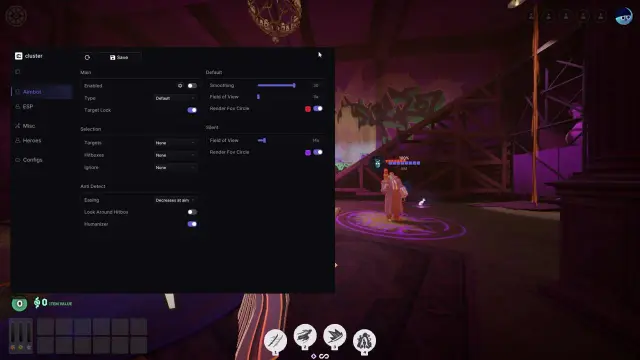
Cluster for Deadlock: The live Cluster Deadlock page lists a configurable aimbot, ESP, Hero Combos, Auto Parry, Souls Aimbot, FOV Changer and Dodger. It shows plan choices and Windows 10/11 requirements. This is a commercial mention; the feature descriptions are vendor claims, not an independent test.
A plan is more than a number
Before paying, write down five details in plain English:
- Duration: when does access start and when does it end?
- Price: is the displayed amount a starting label or the final total?
- Updates: where is current status announced after a game update?
- Support: what channel handles a failed activation or product question?
- Account boundary: does support ever request a password, cookie or recovery code?
The last point is non-negotiable. A provider can explain its own access flow without asking for credentials that belong to your game account.
For more category context, use the site’s Deadlock comparison archive. Keep the final purchase check on the live product page; an old article is not a checkout receipt.
Related reading: how to find a real Deadlock download source, free access versus a trial and the Deadlock comparison archive.
FAQ
Where to buy Deadlock cheats without guessing?
Use the provider’s current product page. The Cluster plan discussed here is listed at cluster.center/en/deadlock; verify the plan and terms there before checkout.
Is the cheapest plan always the best choice?
No. Compare the duration, current status, support route and exact feature scope, not only the starting price.
Details a Deadlock cheat page should disclose
At minimum, look for product identity, feature scope, duration, price context, requirements and support.
Can a feature list prove how well a cheat works?
No. It describes advertised scope. Performance and account outcomes need separate evidence.
Details support should never ask for
Do not send a Steam password, recovery code or browser cookie to activate or troubleshoot third-party software.